
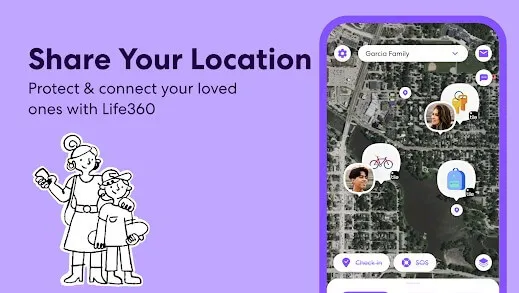
Life360 is a popular family location-sharing app that allows family members, partners, and friends to see each other’s real-time locations. It can be helpful for checking that loved ones are safe, coordinating pickups, and staying connected during emergencies.
However, constantly sharing your exact location can sometimes feel intrusive. If you turn off location permissions directly, other Circle members may see messages such as “Location Sharing Paused,” “Location Permissions Off,” or notice that your location has stopped updating.
If you want more control over the location displayed on Life360, iFlowGo offers a simple way to change your device’s GPS location without disabling location services.
Why Would You Change Your Life360 Location?
People may want to change their Life360 location for many legitimate reasons.
Protect Your Privacy
Life360 can continuously display your exact location and travel history. Even when sharing with family or close friends, you may not want every trip or stop to be visible. Managing your GPS location can help you maintain a healthier balance between personal privacy and family safety.
Keep a Surprise Secret
Planning a birthday surprise, shopping for a gift, or preparing a special event? Sharing your real-time location could accidentally reveal your plans. Temporarily changing the displayed location can help keep the surprise from being spoiled.
Reduce the Pressure of Constant Tracking
Being monitored throughout the day can create unnecessary stress. Frequent questions about where you are or why you visited a certain place may make location sharing feel more like surveillance than a safety feature.
Test Location-Based Features
App developers, marketers, and content creators may need to test GPS features, geofencing notifications, or location-based services in different regions. Changing the GPS location makes testing possible without physically traveling to every destination.
Troubleshoot Incorrect GPS Data
Weak GPS signals can sometimes cause Life360 to display the wrong location or stop updating. A GPS location tool may help determine whether the problem is related to the phone’s location data.
Use location-changing tools only for lawful, authorized, and privacy-related purposes. Avoid changing your location when Life360 is being used for child safety, elderly care, driving safety, or emergency assistance.
Will People Know If You Turn Off Life360 Location Sharing?
In many cases, yes.
The following methods may stop or delay Life360 location updates:
- Turning off Location Sharing in Life360
- Disabling location permissions
- Enabling Airplane Mode
- Turning off Wi-Fi or mobile data
- Restricting background activity
- Changing permission to “While Using the App”
Although these methods may temporarily stop tracking, Circle members could see that your device is offline, your permissions have been disabled, or your location has not updated for a long time.
Turning off your location and changing your location are not the same thing. Turning it off prevents Life360 from receiving new GPS data, while changing it allows your device to display a different GPS location.
Change Your Life360 Location with iFlowGo
Instead of disabling Life360’s location permissions, you can use iFlowGo to change the GPS location displayed by your device. Once connected, Life360 and other location-based apps can read the newly selected GPS coordinates.
iFlowGo provides a simple and secure location-changing solution:
- 100% safe to use
- No jailbreak or root required
- No modified or cracked version of Life360 needed
- Works with the official Life360 app
- Change your GPS location anywhere in the world
- Supports teleport, joystick, and route simulation modes
- Simple setup with no advanced technical skills required
- Restore your real location whenever you want
Unlike a VPN, which mainly changes your IP address, iFlowGo changes the GPS location detected by your device. This makes it more suitable for apps like Life360 that rely on GPS data.
Video Tutorial: Change Your Life360 Location with iFlowGo
Using iFlowGo does not require complicated setup. Simply connect your device, select a destination on the map, and apply the new GPS location.
Watch the video below for the complete tutorial:
Other Ways to Manage Your Life360 Location
Use Life360 Bubbles
Life360’s Bubbles feature allows you to share an approximate area instead of your exact location. It is useful when you want some privacy while remaining connected to your Circle.
Feature availability may vary depending on your Life360 account, region, and subscription.
Turn Off Location Sharing
You can disable Location Sharing directly in Life360. However, other Circle members may be able to see that location sharing has been paused.
Restrict Background Location Access
Changing Life360’s permission to “While Using the App” may reduce background tracking. However, the app could display a permission warning or stop updating when it is closed.
Frequently Asked Questions
Can a VPN change my Life360 location?
Usually not. A VPN changes your internet IP address, but it does not directly change your phone’s GPS coordinates. Life360 primarily relies on device location data, so a VPN alone is generally not enough.
Does iFlowGo require jailbreaking?
No. iFlowGo does not require jailbreaking or installing a modified version of Life360. It works with the official app.
Will changing my GPS location affect other apps?
It may. Maps, weather apps, social media check-ins, and other GPS-based services could also read the changed location. Restore your real location once you have finished using iFlowGo.
How do I restore my real location?
Stop the location simulation in iFlowGo or restart your phone. Your device should then reconnect to its real GPS location.
Can anyone tell that I changed my Life360 location?
iFlowGo does not require you to disable Life360’s location permissions, helping you avoid obvious messages such as “Location Permissions Off.” However, results may still vary depending on your network, operating system, device settings, and the current version of Life360.
Conclusion
Life360 can provide reassurance and improve family safety, but constantly sharing an exact location may also create privacy concerns.
Directly turning off location access can leave visible warnings or stop your location from updating. iFlowGo provides a more flexible way to manage the GPS location displayed on Life360.
There is no need to jailbreak your device or install a cracked app. Simply connect your device, choose a destination, and change your GPS location in a few easy steps.
Watch the video now to learn how to change your Life360 location safely with iFlowGo.