Location services make navigation, device recovery, and location sharing much easier. However, many iPhone users have an important concern:
Can apps or other people continuously see my real location without me realizing it?
When social apps, family-tracking services, or location-sharing apps have ongoing access to GPS data, they may record where you go, how long you stay, and parts of your daily routine.
Some users do not want to turn off location services completely. They simply want more control over who can see their home, workplace, and travel history. If you have similar privacy concerns, you can review your iPhone permissions or use iFlowGo to change the GPS location displayed by your device.
How Does iPhone Location Tracking Work?
An iPhone can use several signals to determine its current location:
- GPS: Provides precise geographic coordinates
- Wi-Fi: Uses nearby networks to improve positioning
- Cellular networks: Estimate your general location through nearby towers
- Bluetooth: Detects nearby devices and location beacons
- IP address: Identifies an approximate country, city, or network region
As a result, turning off one location source may not completely prevent an app from identifying your approximate area.
Location technology itself is useful. It powers maps, ride-hailing services, weather apps, Find My, and voluntary location sharing.
The real questions are:
Which apps can access your location, how precise is the information, and can they continue tracking you in the background?
Why Do People Want to Hide Their Real Location?
They Do Not Want to Feel Constantly Monitored
Apps such as Life360, iSharing, and other family location services allow family members or partners to check someone’s location at any time.
These tools are designed for safety, but frequent monitoring can create stress and make users feel that they have lost their personal space.
They Want to Protect Their Home Address
Using nearby-user features, location-based social content, or check-ins from home may indirectly reveal where you live.
This can be a particular concern for content creators, freelancers, public-facing professionals, and anyone who values personal security.
They Want Control Over Their Travel History
Agreeing to share your location occasionally does not necessarily mean that you want someone to monitor every trip throughout the day.
Location privacy is about deciding when to share, who can see your location, and how long that access should last.
They Are Planning a Surprise 🎁
Shopping for a gift, preparing a birthday party, or arranging a surprise visit can be difficult when your real-time location is always visible.
Temporarily managing the location shown by an app can prevent your plans from being revealed too early.
They Need to Test Location-Based Content
Developers, marketers, and content creators may need to test recommendations, features, or services available in different cities and countries.
Changing the device’s GPS location makes it possible to test these experiences without physically traveling to every destination.
How to Check Which Apps Are Using Your iPhone Location
Go to:
Settings → Privacy & Security → Location Services
You can review the location permissions for every installed app. The available options may include:
- Never: Prevents the app from accessing your location
- Ask Next Time or When I Share: Requests permission again
- While Using the App: Allows access only while the app is open
- Always: Allows the app to access your location in the background
For apps that do not require continuous tracking, choose While Using the App or Never.
You can also disable Precise Location for selected apps. This allows them to receive only your approximate area instead of your exact GPS coordinates.
Protect Your Real GPS Location with iFlowGo 🛡️
Turning off location permissions is the most direct option, but some apps may display messages such as:
- Location permissions are off
- Location sharing is paused
- Location unavailable
- Location not updated
If you do not want to disable location services completely, iFlowGo allows you to change the GPS location displayed by your iPhone. Supported apps will then read the selected location instead of your current physical coordinates.
iFlowGo is designed specifically for iOS location changing and offers:
- Support for iPhone and iOS devices
- No jailbreak required
- No cracked or modified apps
- Compatibility with official apps
- One-click GPS location changing
- Locations available around the world
- Virtual joystick movement
- Single-point and multi-point route simulation
- Easy restoration of your real location
- Support for social, testing, and location-based app scenarios
Unlike a VPN, which mainly changes your IP address, iFlowGo changes the GPS coordinates detected by your iPhone. This makes it more suitable for apps that primarily rely on GPS data.
However, no location tool should claim to be completely undetectable in every situation. Some apps may also evaluate your IP address, account region, network environment, and usage patterns. Results can vary depending on the app and iOS version.
How to Change Your iPhone Location with iFlowGo
The basic process is straightforward:
- Open iFlowGo and connect your iPhone.
- Search for the location you want to display.
- Select teleport, joystick, or route mode.
- Confirm the new GPS location.
- Open the location-based app you want to use.
When you are finished, stop the location simulation in iFlowGo or restart your iPhone to restore your actual GPS location.
Other Ways to Protect Your iPhone Location Privacy
Disable Unnecessary Location Permissions
Review your location settings regularly. If an editing, shopping, or utility app has no clear reason to know your location, disable its access.
Restrict Background Location Access
Change permission to While Using the App to prevent an app from continuously accessing your location after you close it.
Turn Off Precise Location
Apps that provide weather, regional news, or general nearby information may only need an approximate location. Disable Precise Location when exact coordinates are unnecessary.
Review Find My Location Sharing
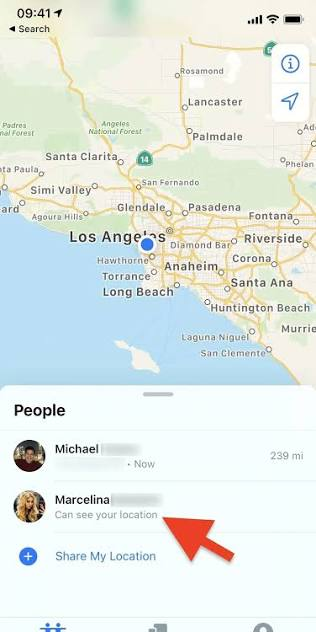
Open the Find My app and select People to see who currently has access to your location. Stop sharing with anyone who no longer needs it.
Review Location Sharing in Social Apps
WhatsApp, Google Maps, and other apps may support real-time location sharing. Check whether any long-term sharing sessions are still active.
Avoid Suspicious Phone-Number Tracking Websites
Websites claiming to locate anyone by entering a phone number are usually unreliable. Some are designed to collect personal information, charge unexpected fees, or redirect users to surveys.
How to Find a Lost iPhone
If you need to locate your own missing device, use Apple’s official Find My service.
For Find My to work properly, the iPhone should already have:
- An Apple Account signed in
- Find My iPhone enabled
- Find My network enabled
- Access to a network or offline location reporting
Using the Find My app or iCloud website, you may be able to view the device’s location, play a sound, mark it as lost, or remotely erase its data.
Use this feature only for your own devices or with clear permission from the device owner.
Frequently Asked Questions
Can a VPN hide my iPhone GPS location?
A VPN mainly changes your IP address. It does not normally change the GPS coordinates detected by your iPhone. If an app relies on GPS, a VPN alone may not change the location it displays.
Can my approximate location still be detected after GPS is disabled?
Possibly. Some services may still estimate your general area using Wi-Fi, cellular networks, Bluetooth, or your IP address. The level of accuracy will vary.
Does iFlowGo support Android?
iFlowGo is focused on changing GPS locations on iPhone and iOS devices. This guide only covers iOS location privacy and iFlowGo use cases.
Does iFlowGo require jailbreaking?
No. iFlowGo works without jailbreaking your iPhone or installing a cracked or modified app.
Will changing my location affect other apps?
It may. Maps, weather services, social media check-ins, and other GPS-based apps may also read the changed location. Restore your real location after you finish.
Can I track someone’s iPhone without their knowledge?
You should not track another person without their consent. Legitimate location sharing requires authorization from the device owner. To find a lost device, use your own Apple Account or obtain permission from its owner.
Final Thoughts ✨
iPhone location services make everyday tasks more convenient, but not every app needs continuous access to your exact position.
If you do not want your home, workplace, or daily travel history to be recorded, start by reviewing app permissions, disabling Precise Location where appropriate, and removing unnecessary location-sharing access.
When you do not want to turn off location services completely but need greater control over the GPS location shown in an app, iFlowGo provides a flexible solution designed for iOS. It does not require jailbreaking or modified apps, and you can restore your real location after use.
True location privacy means having the freedom to decide when, where, and with whom your location is shared.