Have you ever tried to download an app only to see the message, “This app is currently not available in your country or region”?
Apps, games, subscriptions, and prices can vary between App Store regions. If you want to download an app available only in Japan, the United States, South Korea, or another country, you may need to change your Apple Account region or create a separate account for that region.
If the downloaded app also checks your physical GPS location, iFlowGo can help you change your iPhone’s GPS location for a more complete regional app experience.
Why Change Your App Store Region?
There are several reasons why you may want to explore another App Store region:
- Download apps or games unavailable in your current region
- Access apps released earlier in other countries
- Install Japan-, Korea-, or US-exclusive apps
- Update your account after moving abroad
- Test regional content and location-based features
- Use local services available only in certain areas
Keep in mind that your App Store region is controlled by your Apple Account settings, payment method, and billing address. A VPN or GPS location changer alone cannot directly change your Apple Account country or region.
Before Changing Your App Store Region ✅
Before switching regions, Apple recommends that you:
- Spend any remaining Apple Account balance
- Cancel subscriptions that may block the change
- Wait for pre-orders, rentals, refunds, and pending transactions to finish
- Leave your Family Sharing group if necessary
- Prepare a valid payment method and billing address for the new region
- Redownload any apps or digital content you may still need
Some apps, music, movies, and subscription services may not be available in the new region. Check your important content before making the change.
How to Change the App Store Region on iPhone
You can change your region directly from your iPhone:
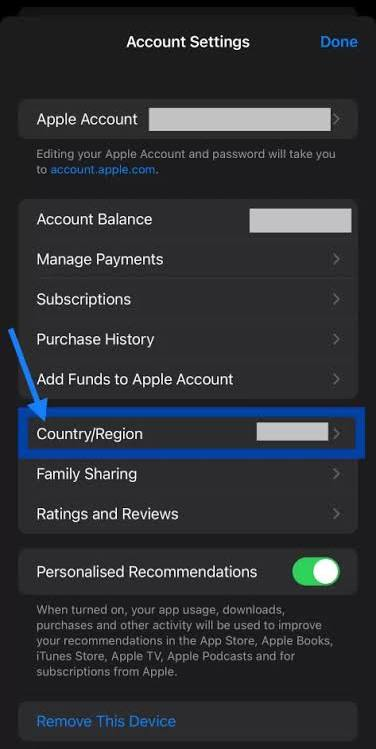
- Open Settings and tap your name.
- Select Media & Purchases.
- Tap View Account.
- Select Country/Region.
- Tap Change Country or Region.
- Choose your new country or region.
- Review and accept the terms.
- Enter a supported payment method and billing address.
Once completed, the App Store should begin showing apps and content available in the selected region.
If you do not want to affect your main Apple Account, you can also create a separate account for the country whose App Store you want to access.
Can a VPN Change Your App Store Region?
Not by itself.
A VPN mainly changes your IP address. It does not automatically change the country or region registered to your Apple Account.
Even when connected to a server in another country, the App Store may continue displaying content based on your existing account region. You still need to update your Apple Account settings or sign in with an account created for the target region.
How Does iFlowGo Help? 📍
Some region-specific apps continue checking your GPS location after they have been downloaded. This is common with location-based games, social apps, dating platforms, and local services.
In these situations, iFlowGo lets you change the GPS location detected by your iPhone, helping you test or use location-based features in another region.
Why choose iFlowGo?
- No jailbreak required
- No cracked or modified apps
- Works with official apps
- Change your iPhone GPS location with one click
- Search for locations around the world
- Teleport, joystick, and route simulation modes
- Restore your real location whenever you want
- Simple setup with no advanced technical skills needed
Please note that iFlowGo changes your device’s GPS location. It does not replace the country or region setting in your Apple Account.
For the best experience:
Change your App Store region first, download the app, and then use iFlowGo if the app also checks your GPS location.
iFlowGo Video Tutorial 🎬
Using iFlowGo is simple. Connect your device, select a destination on the map, and change the GPS location displayed by your iPhone.
Watch the video below for the complete tutorial:
Why Can’t I Change My App Store Region?
If the region change fails, check the following:
You Still Have an Apple Account Balance
You usually need to spend your remaining balance before changing regions. If the balance is too small to purchase anything, contact Apple Support.
You Have an Active Subscription
Apple Music, Apple TV+, iCloud+, or another subscription may prevent the change. After canceling, you may need to wait until the current billing period ends.
You Are Part of Family Sharing
Members of a Family Sharing group may be unable to change regions. Leave the group and try again.
Your Payment Method Is Not Supported
Apple may request a payment method and billing address accepted in the target region. A card issued in your original country may not be supported.
You Have a Pending Transaction
Pre-orders, refunds, rentals, memberships, or other unfinished transactions can also prevent an account region change.
Frequently Asked Questions
Can changing my GPS location switch the App Store region?
No. GPS location and Apple Account region are separate settings. Change the App Store region through your Apple Account, and use iFlowGo when an app also needs a different GPS location.
Will changing my App Store region delete my data?
It should not delete personal data such as photos or contacts. However, some apps, subscriptions, and digital content may not remain available in the new region. Back up important data before switching.
Does iFlowGo require jailbreaking?
No. iFlowGo does not require a jailbreak or a modified app. It works with official apps installed on your iPhone.
How do I restore my real GPS location?
Stop the location simulation in iFlowGo or restart your iPhone. Your device should then reconnect to its actual GPS location.
Final Thoughts ✨
Changing your App Store country or region can help you download apps that are not available in your current location. To make the switch, update your Apple Account region and resolve any issues involving balances, subscriptions, Family Sharing, and payment methods.
If the app continues to check your physical location after downloading, use iFlowGo to change your iPhone’s GPS location—without jailbreaking or installing a modified app.
Switch the App Store region first, then use iFlowGo to explore location-based features around the world.